Click the Button Getting Started
From the first click to a realistic 70–120 minute campaign, without a 200-hour myth.
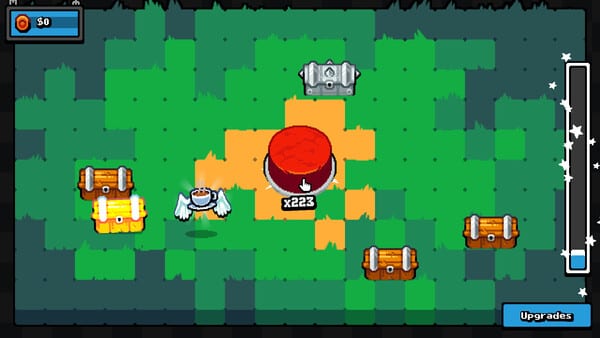
What you just bought
Click the Button is LoopCap’s incremental clicker on Steam for Windows. It released on 26 August 2026 after slipping from a 21 August announce. The store lists about 300 MB, Godot, $3.99 USD list (around $3.39 with the launch 15% off). Reviews landed Very Positive with 1,245 scores. Single-player. Keyboard-only is an option. You can save anytime. Steam Cloud is enabled as of the 27 August 2026 patch, so treat the save as a local file.
The pitch is tiny on purpose: click the button, receive chests, collect items, earn money, spend into upgrades and a skill tree. The full release also adds a gacha machine, extra upgrades, extra items, a larger skill tree than the Demo, button and background cosmetics, and a merge upgrade players credit with stopping Demo-era rebirth crashes. None of that is a live-service calendar. Most people 100% the campaign in about 70–120 minutes. Extra collection and golden cuties can stretch a session by another hour or two. If a video promises a 50-hour or 200-hour grind, it is describing a different product — or inventing one.
This page is the first hour that is not an hour. Twenty focused minutes is enough to understand the loop. The 100% completion route is the checklist when you want all 15 Steam ticks in one sitting.
The first clicks
You get a button. You click it. A chest arrives with an item. Money hits your balance. The click counter moves. That is the entire tutorial. There is no timed prompt and no QTE. Play slowly if you want. Play in bursts if you want. Fatigue is the only skill check, and Hands on Fire! at 10,000 clicks will happen while you chase other goals — do not sit on the title screen grinding clicks in isolation.
Open the first few dozen chests without optimizing. You will see the six rarities in the wild: Broken (common), Nice (uncommon), Expensive (rare), Robust (epic), Nocturnal (legendary), Extraterrestrial (mythical). Early drops skew common. That is normal. Completing a rarity set is a Steam achievement for discovering every unique in that band. Stacking 1,000 copies of each item is a different achievement named Born Collector!. Duplicates matter. Do not trash them in your head as “useless repeats.”
Settings are comfort tools: camera comfort, custom volume, particles if they exist in your build. None of them are power. If fullscreen looks like a 1280×720 postage stamp in the corner, that is a reported Demo bug — play windowed and read controls.
Spend before you theorycraft
When you have spare money, open the upgrade and skill-tree UI. This wiki will not invent official node titles. Buy the affordable click-side nodes and the affordable idle-side nodes as they appear. Leave no cheap branch sitting unbought while you hoard for a screenshot. Our Constellation is maximize all upgrades in the skill tree. The full game’s tree is larger than the Demo’s. A Demo screenshot is not the whole constellation.
Launch’s merge upgrade belongs in that spend list. Demo players reported crashes when rebirthing after opening a large number of chests. People thanked merge for stopping that pattern in the paid build. Buy it because it is part of the released set, not because this page invented a formula. Prestige advice lives on rebirth. For a first campaign, prefer not to reset unless the live prompt is the only way forward.
Demo, full game, and the $1.99 pack
The free Demo is Steam app 4805850. Reception is Very Positive. Some players beat that slice in about 40 minutes. It is a fair taste of clicking and chests. It is a poor taste of gacha, the extra item pool, cosmetics, and the larger tree. Plan real 100% on app 3946950.
The Supporter Pack (DLC 5110650) is $1.99: six exclusive button appearances and design-your-own-scenario. Cosmetic support content. It does not skip Born Collector, it does not fill cuties, and it does not require a promo code — there are no promo codes. See codes if someone sent you a list.
What not to do in session one
Do not install an autoclicker. Players report they can crash the Godot client. A two-hour game does not need a bot. Measure human speed on the CPS test if you are curious.
Do not leave the gacha window open while you alt-tab. Opening the machine pauses the sim. Chests and idle pay freeze until you close it. Short visits. Then click chests again.
Do not treat ghost chests as a secret. They are bug reports. If a chest type is not advancing toward Dungeon Master! (every chest type 1,000 times), stop the clicker, note the type, and check troubleshooting.
Do not assume Cloud will clone the save to another PC. Copy files yourself if you need a backup.
A compact first-session script
- Click until 100 and 1,000 feel automatic (Just the Beginning! and Getting the Hang of It!).
- Spend every cheap skill-tree node you can see. Keep going as income rises.
- Watch rarity uniques: Broken through Extraterrestrial. Steam overlay, not memory.
- Take one short gacha visit if you own the full game. Close the machine.
- Keep opening every chest type. Keep stacking items you already “finished” as discoveries.
- If the UI asks about rebirth, read rebirth before you confirm on your only save.
When you want systems instead of a welcome, How to Play is next. When you want the fifteen ticks in order, jump to 100% completion. Your first session is supposed to feel small, because the product is small. That is the point of a $3.99 Overwhelmingly Positive clicker, not a failure of content density.
Frequently Asked Questions
Quick answers to common questions about the game.
How long is a realistic first campaign?
Most players 100% in about 70–120 minutes. Extra 1,000-count and golden gacha goals can add one to two hours. This is not a 50–200 hour collection MMO.
Does Demo progress become the full game?
Saves are local and Steam Cloud is enabled as of the 27 August 2026 patch. If both apps can see the same file on that machine, you may keep progress; do not count on an account transfer. Gacha and the larger tree are full-game systems either way.
Is there a tutorial?
No separate tutorial. The button, chests, and spend menus teach the loop in the first minutes. There is no timed input.
Should I use an autoclicker to start faster?
No. Autoclickers can crash the game. Human clicking is enough for a 1–2 hour 100%.
Are there codes for a head start?
No promo codes. Ignore third-party lists. Chests and gacha are the reward loops.